
You want to feel safer at home, not more confused by specs, subscriptions, and big promises on a product box. That is exactly why choosing the right outdoor security camera matters so much. The best camera for your home is not simply the one with the highest resolution or the flashiest app. It is the one that fits your entrance, your lighting, your weather, your internet, your budget, and your tolerance for maintenance. As of March 2026, the most reliable buying advice keeps coming back to the same core points: useful video quality, dependable alerts, weather protection, clear storage terms, and strong privacy protection. The FTC, NIST, Consumer Reports, and Which? all point in that direction, even though they approach the topic from slightly different angles.
This guide is built for regular homeowners and renters who want a camera that is genuinely useful in everyday life. Maybe you want to see who is at the door while you are at work. Maybe you are tired of missed deliveries. Maybe your side gate feels too hidden at night. Or maybe you simply want peace of mind when you hear a sound outside at 11:30 p.m. Whatever your reason, the goal is the same: choose a camera that gives you clear evidence, fast awareness, and less hassle.
Key takeaway: the right outdoor security camera is the one that matches your real risk area first, then balances power, video quality, alerts, privacy, and total cost. If you buy in that order, you avoid most expensive mistakes.
Why this choice feels harder than it should
Outdoor cameras look similar in ads, but they solve very different problems. A front-porch camera mainly deals with faces, packages, and short motion events. A driveway camera needs wider coverage and better distance detail. A backyard camera often has to handle darkness, weather, pets, and fewer nearby power outlets. That is why one “top-rated” model can be perfect for your neighbor and annoying for you.
There is another layer too: cameras are not just lenses anymore. They are connected devices. The FTC’s current advice tells buyers to research security features before purchasing and specifically look for encryption for account information, livestreams, and stored videos. NIST’s IoT cybersecurity work makes the same broader point in more technical language: connected home products should support secure updates, sound default settings, and better long-term protection. In plain English, your camera is part security guard, part tiny computer. If the computer side is weak, the whole setup is weaker.
That is also why a camera should never be your only defense. Current police crime-prevention advice still stresses strong doors and secure entry points, because visible security works best when it supports real physical protection instead of replacing it.
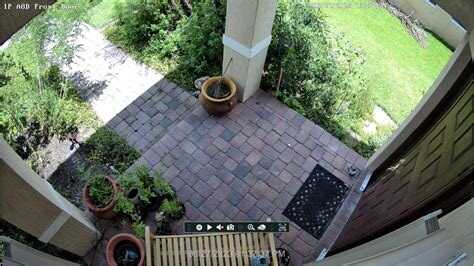
The image above represents the most common starting point: a camera aimed at a front entry. It is simple, familiar, and very useful. But even here, small choices matter a lot. Too high, and you miss faces. Too low, and you get glare, tampering, or too many alerts from passing feet and cars.
Tip 1: Start with the exact spot you need to protect
Before you compare brands, decide what question the camera must answer. This is the easiest way to cut through the noise.
- Front door: “Who came up to my door, and what happened to the package?”
- Driveway: “Did a person or car enter the property, and can I tell what happened?”
- Side gate or backyard: “Is someone moving where they should not be, especially at night?”
- Detached garage or shed: “Can I monitor a farther zone without weak Wi-Fi or constant battery charging?”
This sounds obvious, but many people skip it. They buy a camera with great features, then discover the field of view is too narrow for the driveway or too wide for a porch, causing lots of useless alerts. Think of it like buying shoes: a hiking boot is not bad just because it feels wrong at a wedding.
| Area you want to watch | Best camera style | Main feature to prioritize | Common mistake |
|---|---|---|---|
| Front door | Doorbell or narrow outdoor cam | Face-level detail | Mounting too high |
| Driveway | Wired or floodlight cam | Wide view + strong night video | Choosing battery only |
| Side gate | Compact spotlight cam | Motion zone control | Ignoring fence shadows |
| Backyard | Wireless or solar-assisted cam | Range + weather resistance | Weak Wi-Fi planning |
Real-life scenario 1: You live in a townhouse and mostly care about deliveries. In that case, a camera that shows faces at close range and sends quick package alerts matters more than a huge field of view.
Real-life scenario 2: You have a long driveway. Here, stable power, broader coverage, and better low-light performance beat convenience features like easy peel-and-stick mounting.
Real-life scenario 3: You rent and cannot drill much. A battery or solar-assisted model near the side entrance may be the smarter choice, even if you give up some nonstop recording.
Tip 2: Choose power first, because power decides convenience
One of the biggest hidden differences between outdoor cameras is power. It changes how often you maintain the device, how reliable it is in bad weather, and what features stay available all the time.
Battery cameras are convenient to install and especially attractive if you rent or want a quick setup. But they can force trade-offs. To save battery, they often record in shorter clips instead of continuously, and cold weather can shorten useful battery life. Wired cameras are less flexible to install, but they are usually the strongest choice for heavy traffic areas like driveways or busy front yards because they can support more consistent recording and less charging hassle. Current market and testing coverage continues to reflect that trade-off, and industry reporting in 2026 still shows wired models holding a large share of the market because of their stable connection and uninterrupted monitoring advantages. :contentReference[oaicite:3]{index=3}
Solar-assisted cameras can be a very practical middle ground if the location gets dependable sun. They are especially attractive for backyard fences, sheds, and side paths. The catch is simple: shady placement ruins the benefit.
Key takeaway: if the camera watches a high-priority spot every day, wired usually wins on reliability. If the spot is awkward or rented, battery or solar can still be excellent if you accept a little more maintenance.
Here is a plain-language formula that helps:
Formula 1: First-year cost = camera price + accessories + (monthly plan × 12)
That means if your camera is $140, your mount and memory card cost $25, and the cloud plan is $8 per month, your first-year cost is $140 + $25 + ($8 × 12) = $261. This is much more honest than comparing camera sticker prices alone.
Subscription costs matter because storage and smart alerts are often where brands make their money. For example, Ring’s current official plan information says its plans can store recorded videos for up to 180 days and offer person, package, and vehicle alerts depending on plan and setup. That may be useful, but it also means you should price the system, not only the camera.
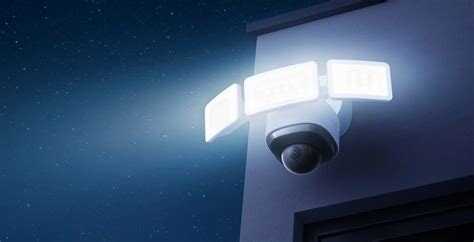
This kind of driveway setup is where power choice becomes very real. If cars, headlights, and frequent motion pass through the frame, a wired camera often feels much less annoying over time.
Tip 3: Look for usable video, not just a big resolution number
It is easy to get pulled in by 2K, 3K, or 4K labels. Higher resolution can help, yes. But the more important question is: can you clearly identify the thing you care about in the place you care about?
For a porch, that may mean seeing a face clearly at close range. For a driveway, it may mean distinguishing a person from a tree shadow or reading what happened near a parked car. Consumer Reports’ buying guidance emphasizes not just video quality, but how cameras perform across privacy, security, and actual testing criteria. Which? also frames its latest outdoor-camera advice around dependable real-world performance, not just headline specs.
Three video factors matter most:
- Field of view: wider is not always better. A very wide image can make distant subjects look smaller.
- Night performance: color night vision is useful, but only if it stays clear and not muddy.
- Placement height and angle: even a strong camera performs badly if you point it into glare, headlights, or deep shadow.
A useful supporting idea is the IP rating. The IP code guide on Wikipedia gives a quick, consumer-friendly explanation of what water and dust ratings mean, so you can decode labels like IP65 or IP66 instead of trusting vague words like “weatherproof.”
| Feature | What it really affects | Good everyday target | Why it matters |
|---|---|---|---|
| Resolution | Detail in faces and packages | 1080p minimum | Too low and details blur fast |
| Field of view | How much area fits in frame | Match to your entry | Too wide can shrink subjects |
| Night vision | Usefulness after dark | Clear person detection | Bad night video ruins evidence |
| IP rating | Dust and water resistance | Outdoor-ready rating | Weather breaks weak hardware |
Mistake story 1: A family buys a very wide camera for the driveway because “wider must be better.” After installation, people near the street look tiny. The camera sees more area, but proves less. The fix is simple: narrower coverage placed closer to the action, or a second camera for the wider zone.
Tip 4: Pay special attention to alerts, zones, and app speed
A camera is not useful just because it records. It has to tell you the right things without driving you crazy. The best app experience is the one that helps you act quickly and ignore nonsense. That means motion zones, person detection, package detection where relevant, and fast load times for live view.
This is one area where buyers often underestimate daily friction. You might tolerate ten false alerts on day one. By month two, you mute the app. Then the camera becomes expensive decoration.
Key takeaway: a slightly less sharp camera with better alert filtering is often the better buy than a sharper camera that cries wolf all day.
Use this practical formula when judging alert quality:
Formula 2: Useful-alert rate = helpful alerts ÷ total alerts
If your camera sends 40 alerts in a week and only 10 are actually useful, your useful-alert rate is 10 ÷ 40 = 25%. That is poor. If careful motion zones and person detection raise it to 24 useful alerts out of 32 total, your useful-alert rate becomes 75%. That feels dramatically better in real life.
In everyday terms, motion zones are like drawing a fence on the screen. You are telling the camera, “Watch this path, not the whole world.” That matters if your porch faces a sidewalk, a busy road, or a tree that loves to dance in the wind.
Mistake story 2: Someone installs a camera facing both the walkway and the street. Every passing car triggers motion. They get annoyed, then disable alerts altogether. A better setup would have been a tighter angle or custom activity zones focused on the gate and steps.
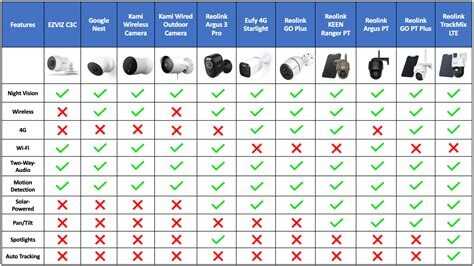
The image above reflects a very common problem: two angles can look similar during installation, but one creates far cleaner alerts because it ignores irrelevant movement.
Tip 5: Check storage rules before you buy, not after
Storage is where many buyers get surprised. Some cameras let you save clips locally on a memory card or home hub. Others push you toward a cloud plan. Neither approach is automatically better. The right one depends on your comfort with subscriptions, your privacy preferences, and how often you expect to review footage.
If you mostly want quick live checks and occasional clips, a light storage plan may be enough. If you want longer history for a second home, frequent deliveries, or repeated night events, you may need more storage than you first think. Ring’s current official plan page says recorded videos can be saved for up to 180 days. Arlo’s current plan page highlights that a free 30-day trial is commonly included with new products, which is useful because it lets you test whether the paid features truly matter for your routine.
Here is the deeper point: storage changes the value of the evidence. A camera that spots motion but does not save the right clip for long enough may leave you with a notification and no proof.
| Storage approach | Best for | Main upside | Main caution |
|---|---|---|---|
| Local storage | Privacy-focused buyers | No monthly fee | Need to manage backup |
| Cloud storage | Frequent review and sharing | Easy remote access | Ongoing subscription cost |
| Hybrid setup | Families wanting flexibility | Balance of convenience | Can be more complex to set up |
Mistake story 3: A homeowner buys a “cheap” camera and only later realizes the package alerts and useful video history are locked behind a monthly plan. The camera was not really cheap. The honest comparison should have used the full first-year cost formula from earlier.
Tip 6: Treat privacy and security as buying features, not bonus features
This point deserves real attention. The FTC’s current consumer advice says to look for built-in security features before you buy, including encryption for your account details, livestreams, and archived videos. It also advises checking how to turn those protections on. NIST’s IoT cybersecurity work reinforces the same mindset from the standards side: connected products should support sound security controls, updates, and maintenance over time. :contentReference[oaicite:8]{index=8}
What should you check in plain language?
- Two-factor authentication: this adds a second lock to your login.
- Encryption: this scrambles your video and account data so it is much harder for outsiders to read.
- Software update support: a camera should keep getting fixes, not feel abandoned.
- Clear privacy controls: who can view the feed, how clips are shared, and whether you can delete data easily.
If “API” or “encryption” sounds too technical, think of it this way: your camera should behave like a trustworthy courier carrying your private package in a sealed box, not like someone yelling your information across the street.
Useful resources here include the FTC’s consumer guide on securing home security cameras, which explains what to check before and after buying, and the NIST consumer IoT cybersecurity page, which helps you understand what stronger connected-device security should look like.
Tip 7: Make sure the camera fits your home over time, not just on day one
The best buying decision is rarely about the first 10 minutes after unboxing. It is about month six. Does the app still feel easy? Are you charging too often? Do you still trust the alerts? Is the footage good enough at 6:10 p.m. in rain? Can you add a second camera without rebuilding everything?
This is where ecosystem fit matters. If your home already uses a smart speaker, smart display, or one brand’s app for several devices, there is real convenience in staying aligned. But do not let ecosystem convenience blind you to the basics. A beautifully integrated camera with weak night footage is still a weak choice.
It also helps to remember current crime and package-theft context. USAGov’s updated crime-statistics page directs people to the FBI’s Crime Data Explorer to review local and national crime patterns, which can help you decide whether your front door, driveway, or side access deserves priority. The USPS Office of Inspector General published a dedicated report on package theft in 2025, underscoring why porch coverage and clear visitor evidence remain very practical concerns for many households.
If you are deciding between two similar cameras, ask yourself these three questions:
- Which one will give you better evidence in your actual problem area?
- Which one will annoy you less every week?
- Which one has more honest long-term costs and better privacy controls?
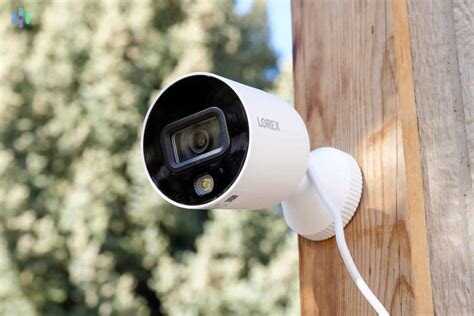
Backyards and side paths are where weatherproofing, Wi-Fi range, and realistic maintenance all come together. This is also where many people realize that “easy to install” is not the same as “easy to live with.”
Three common confusions, cleared up fast
Confusion 1: “More megapixels always means better security.”
Not necessarily. Better placement, better night performance, and better alert filtering often help more than a giant resolution jump.
Confusion 2: “Battery cameras are always easier.”
Easier to install, yes. Easier to maintain in a high-traffic area, not always. Charging and shorter clips can become annoying quickly.
Confusion 3: “Outdoor-rated means fully weatherproof forever.”
Not quite. Outdoor-rated tells you the camera is designed for exposure, but the exact protection level still matters. This is why understanding the IP code is so useful. :contentReference[oaicite:11]{index=11}
A simple buying path for different types of homes
If you live in an apartment or condo: start with the front door or shared-entry view you are allowed to monitor. Prioritize app speed, face detail, package awareness, and low-drill installation.
If you live in a single-family home: decide whether the driveway or front porch is the more likely evidence zone. A wired camera often makes more sense if traffic is heavy.
If you have a larger lot or detached garage: check Wi-Fi reach before buying. A great camera with weak connectivity is a frustrating camera.
If you are privacy-focused: give extra weight to local storage, two-factor authentication, and strong FTC- and NIST-aligned security features.
6 practical links worth opening before you buy
- FTC guide to securing home security cameras — a free, plain-English checklist for encryption, privacy settings, and safer setup.
- NIST consumer IoT cybersecurity page — useful if you want a stronger grasp of what “secure smart device” should mean before you buy.
- Consumer Reports home security camera buying guide — practical testing-based guidance on video quality, privacy, and feature trade-offs.
- Which? best outdoor security cameras — a current 2026 testing-based view of what is working well in outdoor models right now.
- USAGov crime statistics page — a simple route to FBI crime data so you can judge your local risk more realistically.
- Wikipedia’s IP code explainer — a quick, practical decoder for weather-resistance labels like IP65 and IP66.
Final checklist: what the right choice usually looks like
If you want the shortest version, here it is.
- Pick the location problem first: porch, driveway, gate, or backyard.
- Choose power type based on traffic and maintenance tolerance.
- Buy for usable evidence, not spec-sheet bragging rights.
- Make sure alerts are selective and fast.
- Calculate the real first-year cost, not just the camera price.
- Check privacy, encryption, updates, and login protection.
- Think about whether the setup will still feel good six months from now.
The best outdoor security camera for your home is the one that solves your most likely problem with the least friction. That is the thread connecting everything above. If your main issue is package theft, build around porch visibility and storage. If your main worry is a dark side path, build around lighting, motion zones, and weather resistance. If your driveway gets constant activity, build around wired stability and strong night performance.
Once you choose with that mindset, the shopping process feels much calmer. You are no longer asking, “Which camera is best?” You are asking the smarter question: “Which camera is best for my entrance, my routine, and my budget?” That question usually leads to a better answer, and a much better camera.